

Quick Overview
Dayton Audio’s DAX88 8-Source, 8-Zone Distributed Audio Matrix Amplifier delivers the new standard of the multi-zone Wi-Fi audio experience. Providing six stereo amplified zones and two stereo line-level preamp zones, the DAX88 offers the ultimate flexibility in distributed audio for your home or business. The DAX88KP Keypad gives you control over a zone’s function, including volume, power, source selection, mute, treble, and bass.
Product Highlights
- Control over DAX88 zone functions in a convenient in-wall design
- Connects to the DAX88HUB via an ethernet cable for simple installation
Each keypad connects via ethernet cable to the DAX88HUB Keypad Hub, which allows you to connect eight individual keypads to place throughout your home or business. The DAX88HUB connects to the DAX88 with a single ethernet cable. You can assign which zone the keypad controls via dipswitches in the back of the keypad. Note: If you are using more than one keypad, the DAX88HUB is required for operation
Control From Your Wall
If you need quick, accessible zone control, the DAX88 gives you the ability to access total command of the DAX88 via in-wall keypads. You can connect up to eight keypads throughout your home or business that give you direct control over volume, power, bass, treble, mute, and source selection. The keypad has a built-in IR target for use with the DAX88 remote. Also, the keypad has an external IR target terminal if you want to use an additional target in another location.
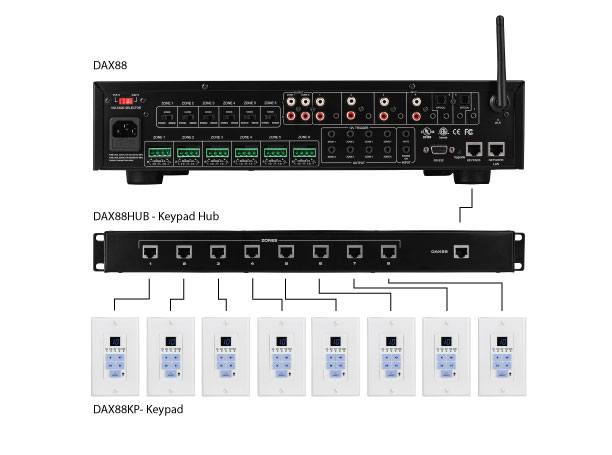
Each keypad connects via ethernet cable to the DAX88HUB Keypad Hub, which allows you to connect eight individual keypads to place throughout your home or business. The DAX88HUB connects to the DAX88 with a single ethernet cable. You can assign which zone the keypad controls via dipswitches in the back of the keypad. Note: If you are using more than one keypad, the DAX88HUB is required for operation

2. EXT/Mute/PA Selection LED: Signals signal from external IR target, zone muted
3. Volume Up/Down: Signals volume adjustment made
4. Source Selection LED: Signals source selection adjustment made
5. Down, Volume, Treble, Bass, Un-Mute: Adjust volume, treble, bass and un-mute current zone
6. Source Select 1-8 Descending: Source select for current zone
7. Infrared (IR) Target: For use with DAX88IR remote control
8. Power On/Off & Mode Select: Power ON/OFF current zone
9. Source Select 1-8 Ascending: Source select for current zone
10. Up, Volume, Treble, Bass, Un-Mute: Adjust volume, treble, bass and un-mute current zone
11. Bass Up/Down LED: Signals bass level adjustment made
12. Treble Up/Down LED: Signals treble level adjustment made
Switch Control
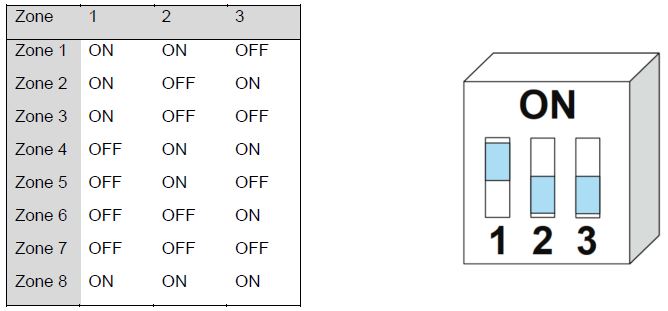
Dipswitches on the back of each keypad allow you to choose which zone the keypad is controlling. Setting the dipswitches give the keypad a distinct address which determines the corresponding zone. Keypads do not have to be plugged into any particular DAX88HUB jack.
Note: The DAX66 keypads are not compatible with the DAX88
Specifications
• Functions controlled: Volume, zone power, source selection, bass, treble, mute
• Connection:RJ45 Ethernet (Cat5e or better cable recommended)
• Dimensions:4-1/16″ H x 1-1/2″ W x 1-3/4″ D
• Mounting depth:1-1/2″
Product Manuals / Spec Sheets / Downloads
Dayton Audio DAX88 User Manual
Dayton Audio DAX88 Brochure
Dayton Audio DAX88 Sell Sheet
| Weight | 0.3 lbs |
|---|---|
| Dimensions | 4.5 × 2 × 2 in |